

Creative Simulator software for out-of-home media owners and agencies
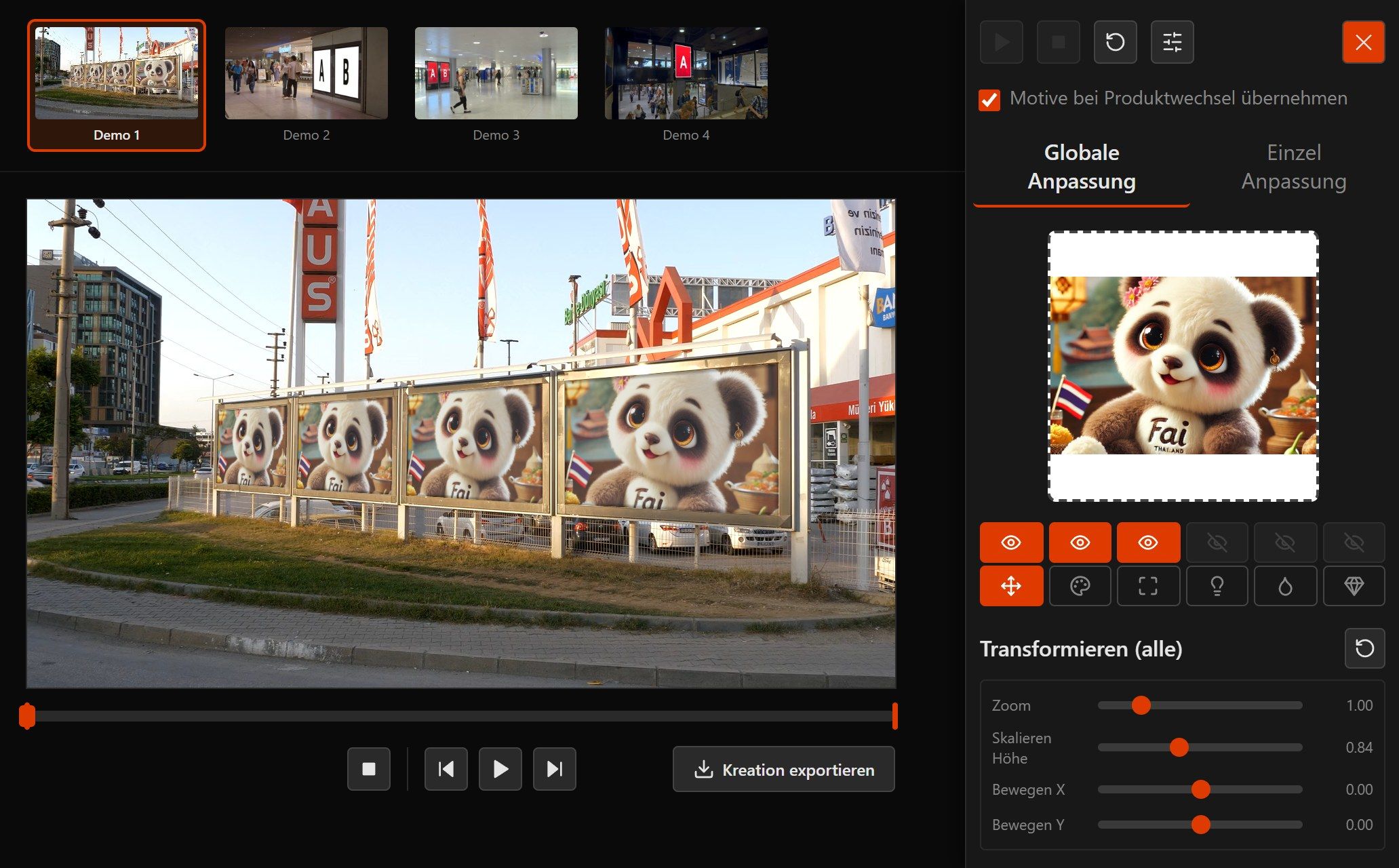
A creative simulator shows an ad creative where it will actually hang. It sits in correct perspective on real footage of a billboard, a City-Light poster or a digital screen. We supply the software as a ready-made platform, in your branding, with an API and video export.
What a creative simulator needs to do
A poster creative looks different on screen than it does on the street. Type that seems generous in the layout is hard to read from twenty metres away. Colours that look rich on a monitor lose depth on a glowing LED wall. A creative simulator shows you this before anything goes into production.
It differs from a mockup file in three main ways. The surface sits at an angle, so the creative has to be fitted into its perspective. Digital surfaces show motion, and no still image can show that. And if you want to show a second variant in a client meeting, you do not have half an hour to build a new file.
Our Creative Simulator is a tool like this, ready to use. Media owners and agencies run it as a tool of their own, with their inventory, in their design and on their domain. We set up the surfaces for you.
What the platform brings
-
Correct perspective
The creative sits inside the surface at exactly the angle the ad surface has in the footage. It looks the way it will on site.
-
Creatives stay in the browser
The simulation runs on your own machine, and for the preview the creative file never leaves it. That matters while you are working with client artwork that has not been signed off yet.
-
Real surfaces in real surroundings
Everything is based on footage of real locations, such as a billboard, City-Light poster, digital screen, station concourse or shopping centre. Passers-by walk in front of your creative just as they do on site. If you like, you can show a location from several angles or by day and by night.
-
Photo and video
Still creatives as well as moving image, as a file, via a link or as a live stream. Photos of advertising sites play with a slow camera move towards the surface. You export as MP4 or JPG, photos in original size if you like, and can present or send the file straight away.
-
White-Label and tenants
The simulator carries your colours and your logo, and every tenant has its own area. Your clients see your tool.
-
API and iframe
Your developers query products through a public REST API, embed the simulator via iframe and control it via postMessage.
Four steps to a preview
- 1
Pick a creative
Drag a poster or video creative into the browser, or take one from the media library.
- 2
Pick an ad surface
Choose the surface from your inventory that the conversation is about. In large inventories you find it through optional search and filters.
- 3
Adjust live
Set the crop and fine-tune brightness, saturation and contrast. You see every change immediately.
- 4
Present and share
Export as MP4 or JPG and drop it into the presentation, the proposal or the approval e-mail. If you like, collect several surfaces and share them as a PowerPoint, PDF, video or link.
Build it yourself, mockup file or platform?
| Criterion | In-house build | Mockup file | Creative Simulator |
|---|---|---|---|
| Perspective | feasible, but costly | fixed, often inaccurate | fitted into the surface |
| Moving image | needs its own video tech | not possible | MP4 export included |
| New variant | development effort | a new file per format | instant in the browser |
| Maintaining inventory | needs its own system | one file per surface | centrally in the platform |
| Your own branding | yes | not applicable | White-Label per tenant |
| Time to first use | months | instant, but limited | minutes for photo surfaces |
Frequently asked questions about Creative Simulator software
What is a creative simulator?
Why a platform rather than building our own?
Does our creative leave the machine?
How do our ad surfaces get into the simulator?
What do our developers need to embed it?
How long does rollout take?
Read on
A Creative Simulator of your own?
We are happy to show you the platform on your own surfaces and tell you honestly what makes sense in your case. Write to us and we usually reply within one working day.