

Test OOH creatives before they go to print
You only find out whether a creative works when it is on the street. Put it on a real ad surface and check what is left of it from twenty metres away. It takes seconds and needs neither image editing nor a mockup file.
Where the mockup file reaches its limits
The classic mockup file is a photo with a cut-out surface that the creative gets pasted into. That is enough for a first impression. It is rarely enough for an approval.
The perspective is only right for that one photo. If the surface sits at a steeper angle, the composite looks wrong. There is no motion at all, even though digital surfaces play spots. And every new variant or extra format means a new file and another round of image editing.
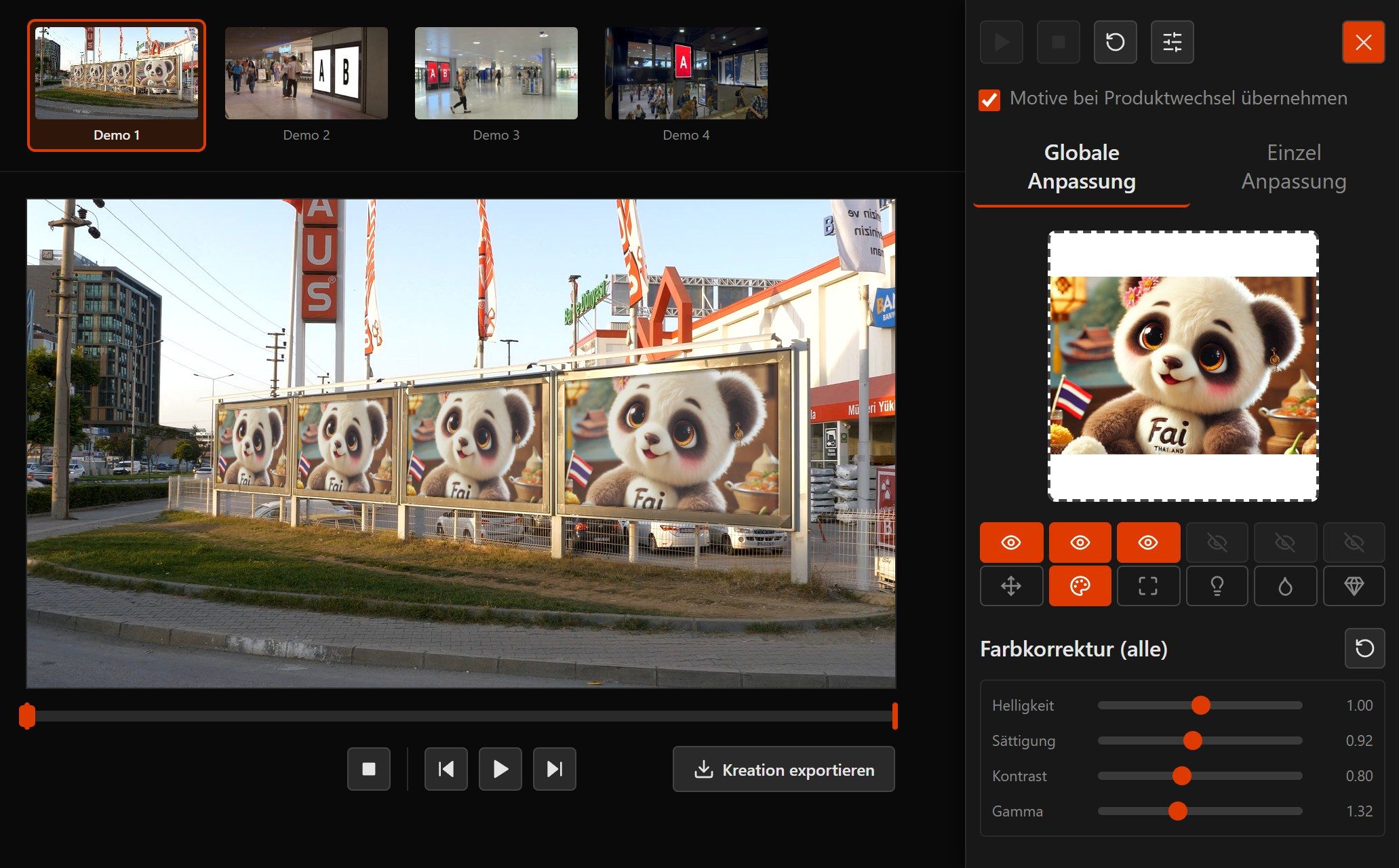
In the live simulation you place one creative on as many surfaces as you want to check, and you see every change straight away. At the end you have an export you can send directly for approval.
What you can check with it
-
Legibility at a distance
Type sizes that look generous in the layout get lost on the surface. In real surroundings you see from which size the message comes across.
-
Contrast and colour
You adjust brightness, saturation and contrast live. That way you find the setting that still holds up on the surface.
-
Crop and bleed
Before printing, you see how much of the creative the surface actually shows. A cropped logo gets noticed before it becomes expensive.
-
Impact in context
A station concourse is not a white background. The creative sits among light, people and other surfaces, just as it will later. Anyone walking past the surface also covers your creative, in video as well as in photos.
How a test works
- 1
Drop the creative
Drag the file into the simulator. On a phone or tablet you can also capture the creative straight with the camera. For the preview it stays in your browser.
- 2
Choose a surface
Pick a billboard, City-Light poster or digital screen from the inventory.
- 3
Fine-tune
Set the crop and adjust brightness, saturation and contrast until the creative holds up on the surface. On a phone you do this right on the image and pinch to zoom into the details.
- 4
Export
Save it as JPG or MP4 and send it for approval.
Mockup file and live simulation compared
| Criterion | Mockup file | Creative Simulator |
|---|---|---|
| Perspective | built for one photo | fitted into the surface |
| Motion | not possible | video with MP4 export |
| New variant | new file, another round | instant in the browser |
| Several formats | one file per format | just switch the surface |
| Software needed | image editing | a browser |
| For approval | limited | export for presentation and e-mail |
Frequently asked questions about creative testing
Do I need image-editing software?
Which files can I test?
Can I test creatives that have not been approved yet?
Can I compare several variants?
Are these real locations?
Does the platform check my creative automatically?
Read on
Put your creative on the surface
The live simulator runs in the browser without a sign-up. If you then want to see how it looks on your own surfaces, we are glad to show you.